Cricket Road Mobile App – Play Anywhere with Full Control
The Cricket Road mobile app brings the fast-paced timing gameplay from the desktop version directly to your smartphone. The mechanics remain identical: time your hit precisely, build multiplier progress, and decide whether to continue or cash out. With mobile access, gameplay becomes more flexible, portable, and intuitive – especially for players who prefer tap-based control.
Why Choose the Cricket Road Mobile App?
The mobile version of Cricket Road is optimized for speed, comfort, and accessibility, allowing you to play whenever it feels right, not only when you’re in front of a computer. Installation is quick, the interface is lightweight, and the game runs smoothly even on older devices. Many players prefer the app because it offers more control over timing and faster reaction capability.
Instant Access to Gameplay
With the mobile app installed, you don’t need to open a browser or sign in repeatedly. The game loads instantly from your home screen, letting you pick up where you stopped without delay.
Smooth Performance and No Browser Limitations
Running the game as an app improves performance stability and input responsiveness. Unlike browser versions that depend on device settings, cache, or connection interruptions, the app environment is clean, consistent, and optimized.
Designed for Fast Timing Actions
Because Cricket Road relies on precise reactions, the app supports instant input response. Tapping the screen at the exact moment feels natural and direct, which helps timing accuracy – especially at higher risk settings.
Mobile App Features
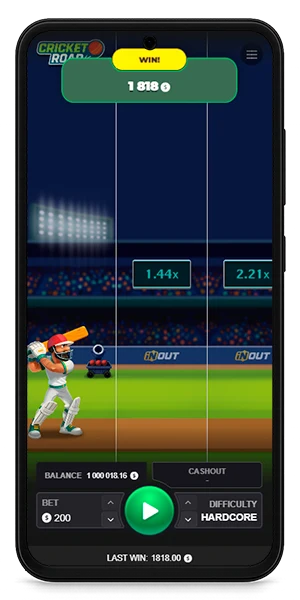
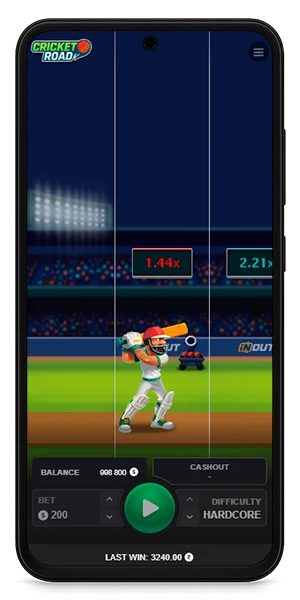
The Cricket Road mobile app includes the same mechanics and interface as other versions, while also offering additional optimizations specifically for handheld devices. These improvements help maintain precision and consistency during timing-critical gameplay.
Responsive Tap Controls
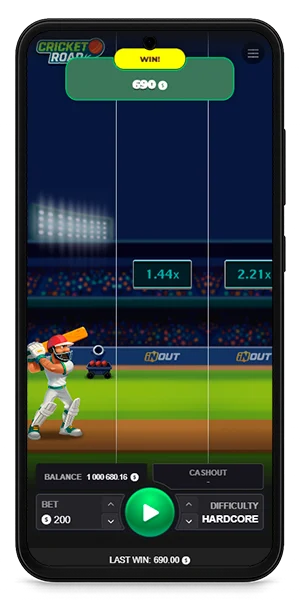
The interface prioritizes tap-reaction sensitivity, ensuring input delay is minimal. This responsiveness is especially noticeable when the ball speed increases and timing windows become smaller.
Adjustable Difficulty Levels
All four difficulty modes – Low, Medium, High, and Extreme – are available in the app. Whether you want steady pacing or fast reflex-based progression, the experience remains identical across devices.
Session History and Player Preferences
The app remembers your previously selected difficulty mode and gameplay preferences. This makes it easy to resume without setting options repeatedly.
Consistent UI Across Devices
The layout matches the desktop version’s logic, so switching platforms requires no relearning. Buttons remain large enough for comfortable one-hand use, and visual spacing supports accurate strike timing.
System Requirements
The Cricket Road app is designed to run on most modern smartphones without requiring high performance hardware. Storage needs are modest, and both battery and data usage are optimized.
Android Requirements
- Operating System: Android 8.0 (Oreo) or newer
- RAM: Minimum 2 GB (4 GB recommended for Extreme difficulty)
- Processor: Snapdragon 450 / Exynos 7 series or better
- Storage Needed: ~150–200 MB free space
- Connectivity: Stable internet connection recommended
Older devices may still run the game, although frame pacing may vary in faster modes.


iOS Requirements
- Operating System: iOS 13 or later
- Supported Devices: iPhone 7 and newer, iPad 2018 and newer
- Storage Needed: ~150 MB
- RAM: 2 GB minimum
iOS devices typically maintain smooth gameplay because of consistent system optimization.
Windows & Other Devices
If installed through emulation or a supported compatibility layer, Windows devices require:
- OS: Windows 10 or later
- RAM: 4 GB minimum
- CPU: Anything above basic laptop hardware is sufficient
This option is mostly used by players who want mobile control feel while still playing on a larger display.

How to Install the Cricket Road App
Installing the app takes less than a minute. Once installed, the app updates automatically or prompts when a new version is available, ensuring you always have the latest features.
Installation on Android
Follow these steps:
- Download the installation file from the official Cricket Road website.
- Open your file manager and tap on the downloaded APK.
- If prompted, allow installation from verified sources.
- Complete the installation and launch the app.
The process is simple and does not require any advanced configuration.
Installation on iOS
For iOS devices, installation is direct and streamlined:
- Open the official download page or App Store link.
- Tap Install to begin the process.
- Once installed, open the app and sign in.
Apple devices automatically manage permissions and resource allocation.
Updating to the Latest Version
The app will notify you when an update is available. Installing updates ensures gameplay smoothness, bug fixes, and access to potential new features.
How to Log In and Start Playing
Logging in is quick, and first-time setup takes only a moment. Returning players skip most steps because the app remembers account details.
Creating a New Account
If you’re new, simply enter the basic information requested. The onboarding is short and doesn’t require complicated setup.
Returning Users
The app loads your previously saved preferences automatically. This includes settings like difficulty mode and interface options.
Restoring Access
If login information is lost, password recovery tools help restore the account securely. No gameplay progress is tied to a single device.
Advantages of Playing Cricket Road on Mobile
Playing on a mobile device offers several advantages compared to browser-based or desktop access. The experience feels more controlled and immediate, especially during rapid timing decisions.
Portable and Convenient
You can play anywhere – at home, while traveling, or during breaks – without needing a fixed workstation or device setup.
Designed for Timing Accuracy
The tap-response system reduces reaction delay and increases precision. This makes timing softer, steadier, and easier to maintain during long sessions.
Optimized for One-Hand Play
Cricket Road’s interface is built for simple reachability, allowing comfortable gameplay without complex gestures.
Fast Load Time and Smooth Performance
The app opens instantly and minimizes unnecessary system overhead, making the experience consistent and efficient.
Supported Game Modes and Settings
Cricket Road includes the same range of gameplay settings as the desktop version – ensuring the experience remains flexible across skill levels and player preferences.
Difficulty Levels
All difficulty modes can be selected instantly before each session, letting you switch styles easily.
Sound, Vibration, and Feedback Options
Sound cues and optional vibration feedback help connect audio-visual rhythm with timing judgment.
Display and Accessibility Settings
Text clarity, color contrast, and interface scaling support players with different device sizes or visibility needs.
Battery and Performance Tips
While Cricket Road is resource-light, adjusting a few settings may improve performance during fast modes or extend battery life during longer play.
Graphics and Refresh Rate Settings
If your phone supports higher refresh rates (90Hz–120Hz), enabling it may make animations appear smoother. If battery life is a concern, standard refresh rate still provides consistent performance.
Managing Screen Brightness
High brightness can drain the battery faster than gameplay itself. A moderate brightness level often improves comfort and keeps the device cooler.
Background App Management
Closing unused applications frees system memory and prevents occasional frame-timing delays. This especially helps during High or Extreme modes, where timing accuracy is critical.
Safety, Privacy & Responsible Play
Your account and personal information remain secure through standard encryption and device storage protection. Permissions are limited to what the app needs for smooth operation.
Secure Data and Local Storage
Gameplay data is stored safely, ensuring you don’t lose progress or preferences.
App Permissions Explained
Permissions remain minimal and transparent, focused only on necessary functions such as vibration feedback and connectivity.
Responsible Gaming Tools and Advice
Using limits, breaks, and pacing tools helps maintain balance during long sessions.
Troubleshooting and Support
Most issues can be resolved through quick adjustments. This section summarizes solutions so you don’t need external guides.
App Not Opening
Restart the device or reinstall the app to refresh permissions and cached files. This resolves most startup interruptions.
Connectivity Problems
Check wireless or mobile network stability. If the signal is weak, switching networks or restarting the connection often stabilizes gameplay.
Delayed Touch or Performance Issues
Closing background apps or restarting the device usually improves responsiveness immediately. Adjusting refresh rate or lowering display brightness may also help if the device becomes warm.
How to Contact Support
If self-resolution doesn’t work, the in-app support link provides access to assistance. Responses typically include clear steps rather than generic replies.
FAQ
Is the app free to install?
Yes – installation does not require extra cost.
Does gameplay work offline?
A stable connection is required for full functionality.
How often is the app updated?
Updates are released periodically to improve performance.
Can I switch devices and keep my progress?
Yes – your account syncs across compatible devices.
Do I need a high-end phone?
No. The app runs well on most modern smartphones.
Is the mobile version different from desktop?
No – gameplay, timing mechanics, and difficulty modes remain the same.